处理数据
现在我们可以 添加身份验证,我们将处理数据,清理我们从客户端获得的输入并添加额外的信息.在本章中,我们需要一个空数据库,可以通过删除 data/ 文件夹(rm -rf data/)来完成.
消除新消息
创建新消息时,我们会自动清理输入,添加发送消息的用户并包含消息创建日期,然后再将其保存到数据库中.这就是 钩子 开始发挥作用的地方.在这种特定情况下, before 钩子.要创建一个新的钩子,我们可以运行:
feathers generate hook
我们把这个钩子叫做 process-message.我们希望预处理客户提供的数据.因此,在下一个询问何种钩子的提示中,选择 before 并按Enter键.
接下来显示我们所有服务的列表.对于这个钩子,只选择 messages 服务.使用箭头键导航到该条目,然后使用空格键选择它.
一个钩子可以在任何数量之前运行 服务.对于这个特定的钩子,只选择 create.在确认最后一个提示后,您应该看到如下内容:

进程消息钩子提示
生成一个挂钩并连接到所选服务.现在是时候添加一些代码了.更新 src/hooks/process-message.js 看起来像这样:
// Use this hook to manipulate incoming or outgoing data.
// For more information on hooks see: http://docs.feathersjs.com/api/hooks.html

module.exports = function (options = {}) { // eslint-disable-line no-unused-vars
  return async context => {
    const { data } = context;

    // Throw an error if we didn't get a text
    if(!data.text) {
      throw new Error('A message must have a text');
    }

    // The authenticated user
    const user = context.params.user;
    // The actual message text
    const text = context.data.text
      // Messages can't be longer than 400 characters
      .substring(0, 400);

    // Override the original data (so that people can't submit additional stuff)
    context.data = {
      text,
      // Set the user id
      userId: user._id,
      // Add the current date
      createdAt: new Date().getTime()
    };

    // Best practice: hooks should always return the context
    return context;
  };
};
此验证码包括:
检查数据中是否有
text, 如果没有则抛出错误将消息的
text属性截断为400个字符更新提交到数据库的数据以包含:
新的截断文本
当前经过身份验证的用户(因此我们始终知道是谁发送的)
当前(创建)日期
添加用户头像
让我们生成另一个钩子来添加一个链接到与用户的电子邮件地址相关联的 Gravatar image,这样我们就可以显示一个头像了. 运行:
feathers generate hook
选择与我们之前的钩子几乎相同:
调用钩子
gravatar这是一个
before钩子… 在
users服务上… 用于
create方法

gravatar 钩子提示
然后我们使用以下代码更新 src/hooks/gravatar.js:
// Use this hook to manipulate incoming or outgoing data.
// For more information on hooks, see: http://docs.feathersjs.com/api/hooks.html

// We need this to create the MD5 hash
const crypto = require('crypto');

// The Gravatar image service
const gravatarUrl = 'https://s.gravatar.com/avatar';
// The size query. Our chat needs 60px images
const query = 's=60';

module.exports = function (options = {}) { // eslint-disable-line no-unused-vars
  return async context => {
    // The user email
    const { email } = context.data;
    // Gravatar uses MD5 hashes from an email address (all lowercase) to get the image
    const hash = crypto.createHash('md5').update(email.toLowerCase()).digest('hex');

    context.data.avatar = `${gravatarUrl}/${hash}?${query}`;

    // Best practice: hooks should always return the context
    return context;
  };
};
这里我们使用 Node的加密库 来创建用户电子邮件地址的MD5哈希值.这就是Gravatar用作与电子邮件地址关联的头像的URL.创建新用户时,此gravatar挂钩会将“头像”属性设置为头像图像链接.
填充邮件发件人
在 process-message 钩子中,我们当前只是将用户的 _id 添加为消息中的 userId 属性.我们希望在UI中显示的不仅仅是 _id,因此我们需要在消息响应中填充更多数据.要显示用户的详细信息,我们需要在邮件中包含额外信息.
因此我们创建另一个钩子:
调用钩子
populate-user这是一个
after钩子… 在
messages服务上… 对于
all方法
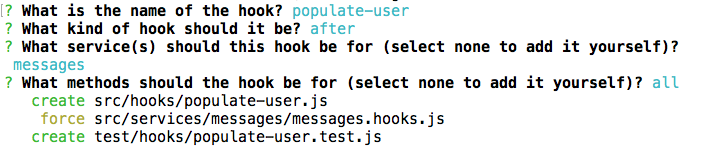
populate-user钩子
创建后,将 src/hooks/populate-user.js 更新为:
// Use this hook to manipulate incoming or outgoing data.
// For more information on hooks, see: http://docs.feathersjs.com/api/hooks.html

module.exports = function (options = {}) { // eslint-disable-line no-unused-vars
  return async context => {
    // Get `app`, `method`, `params` and `result` from the hook context
    const { app, method, result, params } = context;

    // Make sure that we always have a list of messages either by wrapping
    // a single message into an array or by getting the `data` from the `find` method's result
    const messages = method === 'find' ? result.data : [ result ];

    // Asynchronously get user object from each message's `userId`
    // and add it to the message
    await Promise.all(messages.map(async message => {
      // Also pass the original `params` to the service call
      // so that it has the same information available (e.g. who is requesting it)
      message.user = await app.service('users').get(message.userId, params);
    }));

    // Best practice: hooks should always return the context
    return context;
  };
};
注解
Promise.all 确保所有调用并行运行,而不是顺序运行.